My girlfriend just asked me the “Why?” question … and she doesn’t even know about the storage space on my main server, as it’s well hidden and VERY silent (and mostly off anyway)
One of my larger drives is just flagging issues, so I had to replace that.
I’m now copying data … finished in 23 hours, WTF?
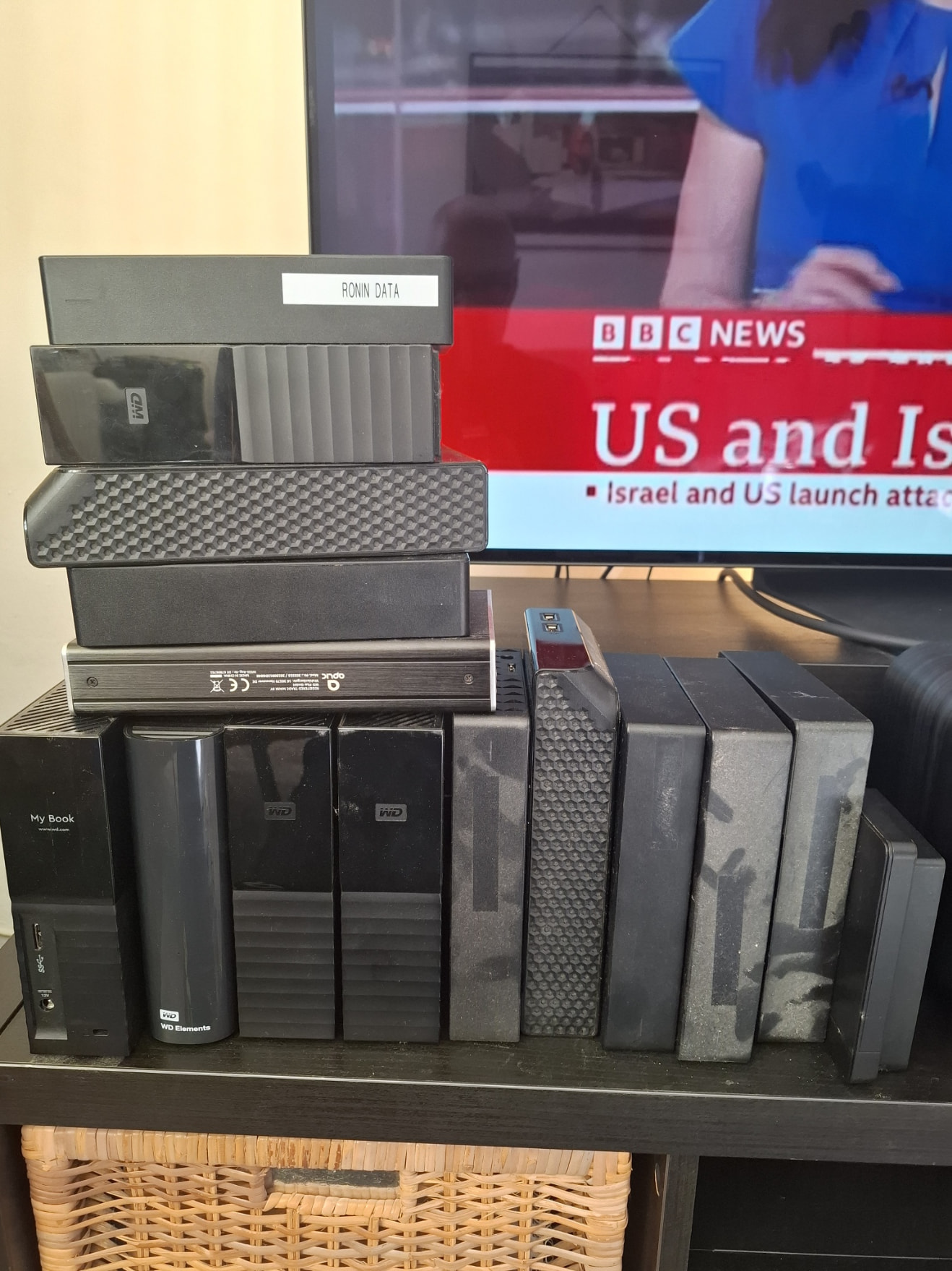
As my gf is on a girls weekend, I’m now reorganizing my main server, so this is what (part of) my storage looks “in the wild”:
I “only” have 6 TB of external storage: 2 x 2 TB Samsung USB3.2 SSDs and 1 x 2 TB Samsung Thunderbolt 3 SSD. In total, they’re about 65-70% full. Sampled VIs consume SO much space. That’s why I’m so happy to see the major improvements in audio quality in modeled VIs like Pianoteq and the AAS VIs.
One of my friends has a small safe that can survive fire, so his external hard drives would be safe. It seems if you wanted something like that, you would need a very large safe!
I don’t have a safe, but it wouldn’t be a bad idea to have one that could protect important documents etc against fire. But what about the basses? What about people who have lots of basses? One would need a very large fireproof room.
I have more on my main Laptop (8TB NVME). My gf is probably right: I have a issues
But: I’m currently selling all SSD’s under 2TByte. Prices are good for selling, and I have large collection of SSDs, as I found out while going through my stuff.
Buying SSDs larger than 2TByte s#cks though…
Don’t ask questions like that! It’s something I think about a lot.
While discussing this with my girlfriend (she is in the “reduce to the max” fraction), I had to explain to her that reorganizing data with the goal to reduce space would take me weeks if not months.
I’m sure if I were to clean up (removing duplicates and unnecessary data), I could live with half of the storage I have. I’m also sure that I will do stupid stuff (like deleting important data) when reorganizing.
A good example is my email backup. I have all personal and professional emails from 1997 up to now (115 GByte!). And that’s only cause I “reorganized” in a way that I lost everything before 1997 - and some emails were very important (love letters, concepts, game designs, scientific articles I wrote).
Making this grave error makes me reluctant to delete anything…
It’s easier to just get another hard disk and put all data on it.
That’s also one of my fears. I’m sure I have duplicates of things, and going through it is a lot of work, and it has risks. Years ago when I had photos backed up to Google Photos, Google started to decrease the size/resolution of files. So now I have duplicates that might have less resolution. I’m not sure, but possibly one could use powershell to help searching and comparing files. But I haven’t tried that. It’s something I have to think about. It is less work to just keep everything.
Sometimes I had been extremely well organised, and sometimes not, so I might have the same things in different locations.
Alldup - to find duplicates based on all kinds of criteria
Advanced Renamer - to batch rename files to something that makes sense
Alldup is very cool, as you can do all kinds of elaborated stuff (comparing folders, searching for the same files that have different names, etc.).
Still, you need to know what you’re doing, as it can go wrong too (I know, believe me!!!). If you are unsure, you can choose NOT to delete, but move duplicates to another folder - so you can recheck.
I did exactly that decades ago when MD-DOS 5 was released. I had a high-end PS/2 with a 330 MB hard drive (tiny now, but huge back then) and a digital tape backup built-in. I had drives C:, D:, E:, F:, G:, H:, I:, J:, K:, L:, and M: virtual 32 MB volumes (the max for MS-DOS 3) mapped on it. DOS 5 supported large volumes, so I created batch files to back up each of those virtual volumes to tape. I tested them to make sure each one worked individually, then created a batch file that called each of the volume backups in sequence. I let it run and took a LONG lunch. When I returned after lunch and a couple too many beers, I installed DOS 5 and reformatted the hard drive to one large volume. I inserted my backup tape and discovered the each of the individual volume backups from DOS 3 was empty. I lost YEARS of work. The worst was all of the outstanding systems quotations. When a field sales person called me saying they’d finally closed the sale and could I create the systems P.O., I had to have them fax my original quote back to me. That was as sick to my stomach as I’d ever felt.
Hahaha!
I had a similar situation last year. Not from beers, but after going to a party on Friday night, and somehow returning from various other parties on Sunday evening…
I was still very awake, so I thought: let’s move my 6TByte FLAC data to other drives.
I copied back & forth, formatted here and there, clicked on “OK”, everything routine, done it 1000s times.
Just to find out that I formatted both SSDs with all of my FLACs, no recent backup to be had.
I had an old FLAC backup with 70% of the data … and an up to date storage with all of my FLAC tracks as lossy M4U/AAC tracks.
So I had to find all missing FLACs using the lossy files as a reference and re-rip them or download them from “somewhere”. It took me about three weeks to recover data … and I still find missing FLACs sometimes, to this day…
It was hell! Now I have four backups of my FLACs - none of them less recent than two weeks.
Keep in mind when backupping to SSDs:
Those use NAND memory. Although it is “persistant” storage, NAND is kinda volatile and isn’t very good in the usecase of “store data on it and put it in a drawer”.
You should put it on power from time to time.
Depending on the density, this might only be an issue in a timeframe of 10 years, with higher density, it might get in the only 1 year ballpark.
Backupping (I like the word!) to SSD is nonsense in most cases anyway.
Working drives need to be fast, backup drives need to be large. If they are fast, they are very very very expensive.
I just replaced a 16TB drive. It cost me 320€. I found it expensive already, compared to the good old days (= last year).
I don’t dare to calculate the costs for something like that in terms of SSDs.
I’m soooooo happy that I upgraded my main laptop to 8TB last year - if I would sell it end of this year I can buy a boat, a sports car and a little shag at a lake in the Provence
I wound up upgrading my Proton sub to get Proton Drive. The upgrade included Proton VPN, but I bought Mullrad VPN a couple of months ago. Well, when I was syncing some folders up to the Drive and I was downloading a large TV series, YouTube started stuttering on me. I ran the Ookla Speedtest through Mullvad. Holy crap, did it consume a lot of bandwidth. I uninstalled it, installed the Proton VPN and got 3X the upload and download speeds. It might be slightly less private than Mullvad, but that extra privacy isn’t worth the major speed reduction. I have a gigabit fiber internet connection, but I need to use a range extender to get good wi-fi signal strength back to my office/studio. The extender cuts my speed in half. Proton basically gives me the full speed that the extender can deliver. Mullvad cut it by 3X. Since I’m paying for it in my Proton sub, it’s not costing me anything more than what I am already paying.
I have the same issue. I’m going to buy a range extender, but sometimes I use a long cable to connect the modem directly into my computer in the other room, to get the full speed.
I had been lazy and used my old mobile phone instead of a range extender I connected it to my WiFi, placed it halfway between the living room and the room where my computer is, and used the tethered connection through the phone. It works! The cable is still the fastest connection, but not too practical, because then I have to place a rug in one place so we won’t stumble on it.





 I connected it to my WiFi, placed it halfway between the living room and the room where my computer is, and used the tethered connection through the phone. It works! The cable is still the fastest connection, but not too practical, because then I have to place a rug in one place so we won’t stumble on it.