Though I’m pleased that the rest of the musicians are gradually being added to the songs in the 100 song pack, I’m now struggling to hear the bass line I’m meant to be following! It’s a pity there isn’t an option to just isolate the bass track (or turn the other musicians volume down a bit!). Oh well, I’ll get the hang of it I guess! Anyone else struggling with this, or is it just me?
Yeah yeah, bass players, never happy!
Sorry to be a nuisance. I’m still a beginner here!
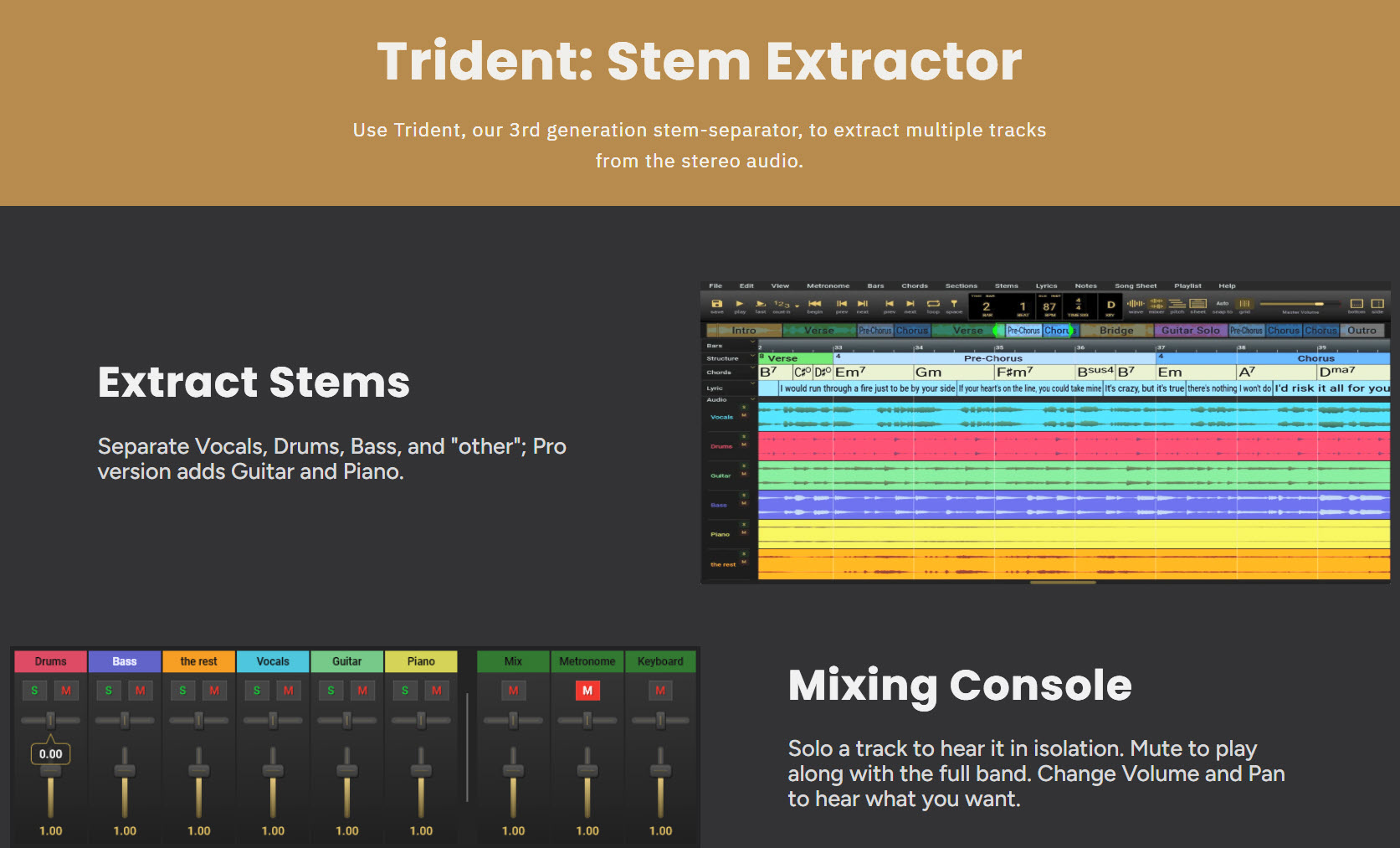
Hi, Steelie! What you’re referring to is called stem separation: an app that reads a stereo file and splits out the instruments into separate audio files. There are several choices, like Moises, but for me, Song Master and Song Master Pro from Aurally Sound work the best because the offer a lot more capability for learning songs, not just stem separation. Plus, they sell perpetual licenses, so you’re not paying a monthly or annual subscription fee. I’ve been using Song Master Pro for many years. Highly recommended!
In the image above, you’ll notice that Song Master extracts 4 stems and Song Master Pro extracts either 4 or 6 stems. I own the Pro version, but for learning bass lines, I use the 4 stem option. I will only need the 6 stem option which adds a Guitar stem when I get going on the new Beginner to Kickass guitar course, new from our friends here at the Beginner to Badass bass course. If you don’t need the extra goodies that come with the Pro version, save your money for bass gear.
Have either of you used the competition? I.E. If you use Audacity have you tried Song Master and vice versa It all looks pretty complicated to me so I’m looking for which might not overwhelm my age adelled brain. Thanks.
Yes. Several. The resulting stems are all fairly close. My choice was based on other factors:
Perpetual license vs. subscription
Mixer (or lack there of) and playback options like speed control (or lack there of)
Additional useful features (why I chose SMP over SM)
Concerning Audacity:
The fugly UI in previous versions has been replaced by a decent UI in v4. But…Audacity is now part of Muse. It’s still free, but you need to install Muse Hub to download it. I appreciate what the devs did with the major reworking of Muse 4, and I appreciate their need for income to pay the bills and feed themselves. I really disliked the implementation, so I uninstalled Muse Hub and Muse 4 and Audacity 4. YMMV.
I started with Audacity v3 + OpenVino, but on some songs the results were disappointing. I tried Moise hoping for better results, but they were the same, so I stuck with Audacity. I suspect the quality of the source sound file is what makes the difference.
Not entirely. I think a lot depends on what else is going on. I mainly use Moises but sometimes it pulls out more than just the bass, leaving the remainder sounding tinny. Though that doesn’t matter much if you just want to get the bass line, but if you want to use the remainder as a backing track it’s pretty c**p! Then I tend to use the full track as the backing track.
Two tracks I’ve had this issue with are Brick in the Wall and The Girl from Ipanema.
Well, that went in a different direction than I’d imagined.
@JoshFossgreen is it possible to add a “turn off the rest of the band” switch to the 100 song pack? Or is that asking too much of the software? No hurry, I expect you’re still enjoying the big smoke (London) this week…
Ah, that’s a pity! If I was clever enough I’d’ve downloaded the original midi, but never mind. I guess it’ll improve my listening skills, if nothing else!
I think I’m getting the hang of playing alongside the backing tracks now. Only downside seems to be, if there’s a backing track then slowing it down has no effect for some reason. Hoping that’s a temporary glitch!
Thanks for the info. Maybe this response will save someone some time.
Being an extremely frugal, aged learner, I got all excited about the comments regarding audacity 4 and openvino but it doesnt seem openvino will be ready for Audacity 4 until the end of the year. I expect it will be a nice package. Perhaps Audacity V3 will suffice till then.
From audacity forum
“unfortunately there are no estimates right now, only rough “it will be there by the end of the year .We have a working prototype, but we still have not settled on the final design of the third-party modules.”
I also have problems locating the bass, especially in heavy metal songs, with a bunch of mess around that frequency.
You could try some browser based applications. I found this open source app that runs locally on your machine, so it can be a bit slow depending on how old it is. It only works with browsers like Chrome (not Firefox, unfortunately).
Most AI based stem separation tools use the same underlying AI model, including the openvino IIRC, so the results should be fairly similar.
AI stem separators such as Moises (which I do use) will distinguish frequencies. However, Moises will separate 5 or six different stems (again based on frequencies) which works, but with music, there are so many frequency carryovers that you can actually get confused as to what is “real” and what is “carryover”…. I’ve run into this many times, and have found that when doing a cover of another artist’s song, you need to be cognizant of the song’s chord and key layout…. Unless you understand a bit of music theory, you’ll end up down a rabbit hole to hell (well, so to speak)…. My best suggestion is to learn to trust your ears…. Learning a musical score on any instrument can be done two ways - learning to read music, or learning to trust your ears….. When it comes to playing bass, I’ve (just me speaking), have learned to close my eyes and let the music guide my fingers…. Thing is, by doing this, I don’t have to “memorize” sheets of music which over time are forgotten in my old feeble brain cells - learn to feel the music and you’ll never forget how to play a song, and better yet, you’ll be able to jam with anyone even though you’ve never played the song that they’re playing….