Are those addons compatable with a Presonus DAI or are these stand alone apps? Seems to be just what I want.
You don’t need any special DAI, just Audacity and the Open Vino Plugins. Both are free, so yeah I’m pretty sure your presonus dai will work with Audacity.
The only thing is that the stem separation process can take some time depending on your hardware, but it’s a one time process (per song).
Here is a 10 minute tutorial on how to do it:

2 Likes
im on a trial of reaper at the moment, think it costs around £30 if i go ahead with it after 30 days. so theres no real need, audacity and the plugins will do the job just the same for free?
what im trying to do is play bass to a bassless track, and record my bass into it instead of the original.
once ive got that sussed ill try videoing myself (to look for improvements in fretting action, that sort of thing) and putting the whole thing together but i know ill need different software for that.
thanks
1 Like
It depends on what you want. Reaper is a full featured DAW for music production. Audacity is a good audio file editor and track recorder but very poorly suited to music production compared to a real DAW.
It depends on what you want.
i guess just to be able to reproduce some of the videos that people put up on to be critiqued, like the ‘50 songs’ examples. when i record with my phone it just sounds tinny, so i figured i’ll try and get a decent sound of a bassless track, then either leave it at that or join a video to it as well if im able to. id like to keep it simple, but anything i have that records in a ‘oner’ just sounds crap.
thanks
1 Like
this is a good thread and video to get you started:
2 Likes
not having much joy. is it only available on vimeo? ive signed into my account but it says i need to do the age verification thing. it sends me a link which it tells me to open on my phone, i do, then it says i cant continue as im using a different device. tried using the macbook, my phone, different email addresses, im just going round in circles so given up.
thanks
I tried my first OpenVino STEM use on Audacity, the Barney Miller TV show opening theme, only 47 seconds long.
It has a great bass line, which i hope one day to learn.
Apparently this forum does not support uploading an *.aup3 file, only image and document files?
Let me know if anyone wants it (100.9 MB file) and we can figure out a transfer.
Their videos are only on Vimeo but the thread itself also has lots of info.
For recording your bass, you really will want a USB digital audio interface. It can be a cheap one - and some are also built in to other gear (some pedals, some amps, etc). Anyway, they connect to your computer via USB and allow for both audio input and output. You plug your bass in and play.
Next you want some recording software. The best choice is a DAW such as Reaper (a fine DAW with a great licensing scheme - one of the best buys in music). You can also get by with something like Audacity but are much more limited in what you can do later - that’s why I asked about your goals. Audacity is capable of doing what you want but you will be getting close to its useful limit. For any serious audio editing for music, you’ll want a DAW.
Next you’’ll want a stem separator for what you want to do. That’s what the OpenVino that people are discussing in this thread does. Most people on the forum use either Moises (an online service) or the stem separation built in to many DAW (Logic Pro has it, as does Studio One, etc).
A good alternative there is RipX, a DAW built around stem separation as its main use case. It’s not as good a general purpose DAW as Reaper but for stem separation it’s probably the best out there, and is way more capable than Audacity.
Anyway, once you have this set up, you take a music track like a mp3 and load it in the DAW (just drag it to a track). Then separate the stems in the DAW with a stem splitter, discard the bass track, and record your own bass track.
Video is another story, that’s covered well by Pam and John.
Actually none of this is really my thing, I really dislike stem separation and backing tracks myself, just passing on what most people do. I don’t have a horse in this race 
The forum doesn’t host media at all - recommend SoundCloud or YouTube.
it looks like those videos are actually in the very first post on that thread, i should have gone there first rather than faff around with vimeo 
For recording your bass, you really will want a USB digital audio interface. It can be a cheap one - and some are also built in to other gear (some pedals, some amps, etc). Anyway, they connect to your computer via USB and allow for both audio input and output. You plug your bass in and play.
i have a xenyx 302 usb, i think its made by behringer? i had a short play with it and it seems to do what im after altho its a little technical for my small ‘non tech’ brain 
Next you want some recording software. The best choice is a DAW such as Reaper (a fine DAW with a great licensing scheme - one of the best buys in music). You can also get by with something like Audacity but are much more limited in what you can do later - that’s why I asked about your goals. Audacity is capable of doing what you want but you will be getting close to its useful limit. For any serious audio editing for music, you’ll want a DAW.
ill stick with reaper then as you and others recommend it. ill buy the licence when the trial runs out. i dont think i’ll use it much as i dont expect to do this sort of thing that often, but its cheap enough i guess.
Next you’’ll want a stem separator for what you want to do. That’s what the OpenVino that people are discussing in this thread does. Most people on the forum use either Moises (an online service) or the stem separation built in to many DAW (Logic Pro has it, as does Studio One, etc).
well so far i just downloaded the bassless version of bad moon rising. i tried moises previously but didnt think much to the bass it isolated, very muddy, altho i guess that would be down to the original track. i think you get one track a month or something dont you, so may have another look as like i say, i dont expect to be doing this much. just one question, if im paying for reaper, does this software separate stems too? or should i also download audacity (and plugins) just for this purpose?
Anyway, once you have this set up, you take a music track like a mp3 and load it in the DAW (just drag it to a track). Then separate the stems in the DAW with a stem splitter, discard the bass track, and record your own bass track.
as above, would i separate stems within reaper itself?
maybe these questions are answered in the ‘pam and john’ thread, ive only glanced at it so far and seen the 2 videos in the OP, but looks a very interesting thread to read over a cup of tea, so thank you very much for that.
i appreciate your time, cheers.
Reaper doesn’t have builtin stem separation so you would need either a daw plugin or to do it in something like Moises and then just load all the stems in Reaper instead of the original track.
1 Like
just watched the first video, its really helpful. i recorded my bass line on top of the bassless ‘bad moon rising’. it shows how playing in front of family recieves all the plaudits for being an amazing bass player, but when you actually sit down and listen to yourself you realise “if only you knew”
after watching the video tho it helped me to understand what was actually going on rather than just blindly following instructions on ‘press this, then press that’.
i’ll give moises another try for separation when i cant find the bassless track on here. baby steps and all that….
thanks
2 Likes
awesome!
1 Like
Yeah I’ve said it before but it’s like a different more critical part of your brain is engaged when you sit back and listen to a recording of yourself. That’s why the whole ‘post your covers’ thread is invaluable. It really improved my playing.
It’s good though you’re doing the right thing. Just don’t be too hard on yourself because it can be pretty rough hearing it for the first few times 
3 Likes
i guess its best to wait until i can post a video for full critique yes, rather than just a track? i’ll start watching the 2nd video on linking the sound and video tomorrow i think.
No you can post just a track if you want to. Either SoundCloud or a YouTube video with a still picture will work.
1 Like
Soundcloud will ding you on copyrighted material though, and take it down. Youtube will work even with most copyrighted stuff.
2 Likes
Thanks didn’t know that. It doesn’t for our cover band but I guess we’re so off the mark the algorithm doesn’t recognize it 
1 Like
At least that was my experience. I forget what it was I tried to post there, but yeah they flagged it pretty quickly. Oh wait, still have it:
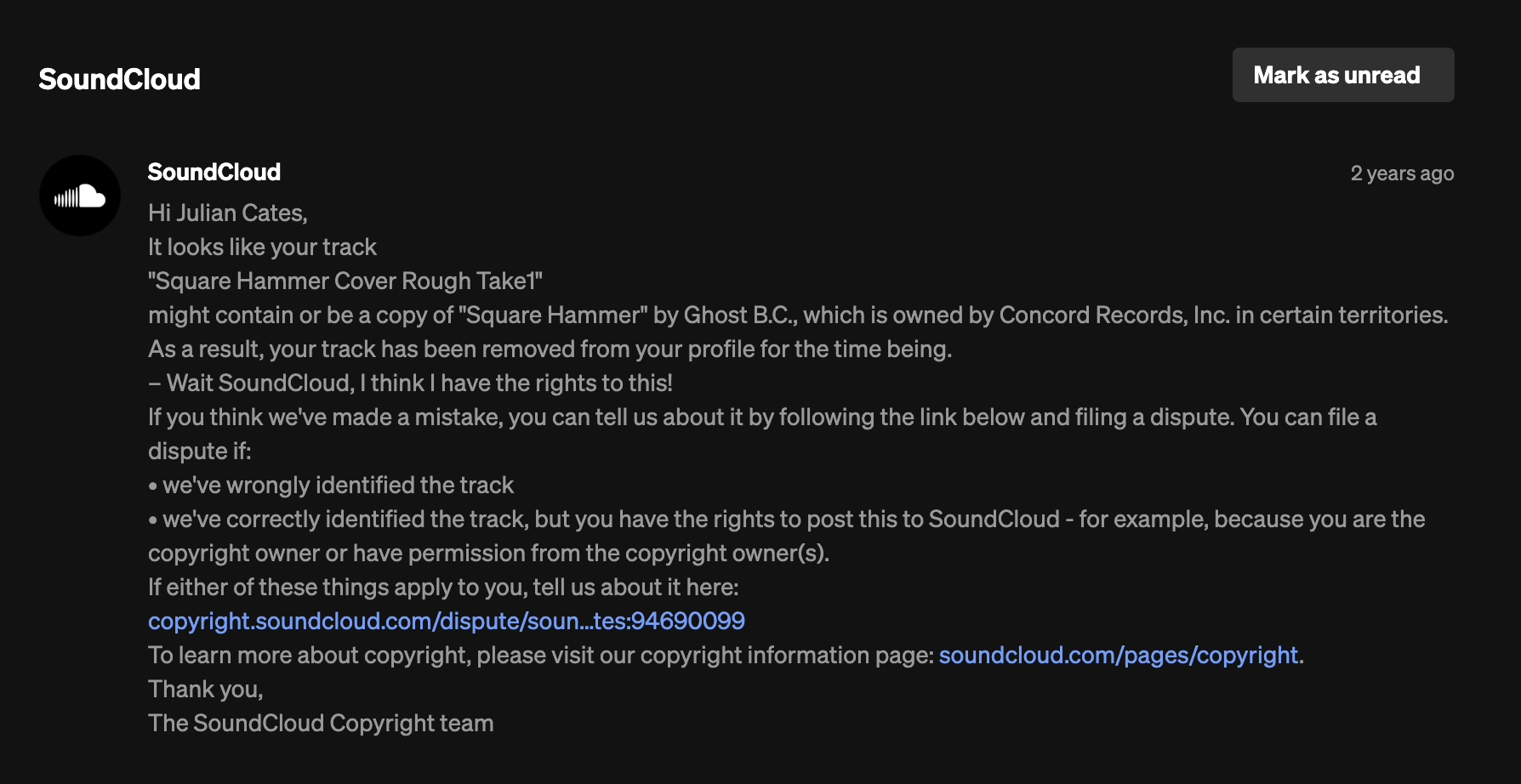
1 Like
As of 9/4/26, Audacity has released a major update as Audacity 4. However, they also announced that OpenVino is not compatible with Audacity 4. I don’t know whether Audacity, or OpenVino, or both will need an update to become compatible. In the meantime, we still have Audacity 3 + OpenVino for free STEM software.