ok-ish/cheap? 
It’s “just” a guitar, so not important really. I need a “wall of sound” on one part of the track, and this is where the guitar comes in.
I use Shreddage 3 Stratus Free currently, which is ok. But I’m not 100% convinced.
ok-ish/cheap?
It’s “just” a guitar, so not important really. I need a “wall of sound” on one part of the track, and this is where the guitar comes in.
I use Shreddage 3 Stratus Free currently, which is ok. But I’m not 100% convinced.
Hahaha!
My guitar playing skills are even worse than my bass playing skills (as in: non existent).
And for this use case I really want the guitar sound non-artificial … mainly to mock a friend who is a guitar player … to show him that he is not necessary for proper songs
I would just look for sample packs then, and construct the chords as you wish in MIDI (i.e. from single notes.)
Also, if you can play bass, you can play a guitar solo. Simple guitar lead lines are natural and easy for bass players, it’s chord changes that are hard.
Got UJAM Sparkle 2 from UJAM for $10 on Knobcloud.
With Amplitube it now sounds dirty, distorted and broken. Love it!
Ok, didn’t solve it. I can set the output to an instrument, not to a track. That means that it saves memory (as only one instance of the instrument is used), but not my issue, as I still need to config every track individually.
Also, Studio Pro cannot assign an instrument to a bus track, WTF?
So the plan to have non-instrument MIDI score tracks that send MIDI notes to a bus which has an instrument does not work. WTF? WTF? WTF!
This is such a basic feature that would help organize a track properly. Studio One is on V8 now, nobody thought of that?
Don’t get it!
Just save a copy of the synth patch with your tweaks and load it on each track.
Put all of the tracks into a single bus and put the effects on the bus.
The bus solves the effects issues, as I can put all effects (EQ, Fuzz etc) on the bus. that’s great!
But I would need to save the settings of the instrument (in this case the bass) to a custom preset and apply it to all other tracks after saving - every time I change things.
It’s not only tedious, it does not allow for playing around with instrument settings that affect all bass tracks and listen to the result in real time (ie plucking vs pick).
I find it strange that I can assign effects to a bus, but not an instrument.
Next weekend my girlfriend has her yearly girls weekend out with some other weird girls, celebrating the Walpurgis Night at some haunted spot, dancing nude around a fire all night, highly intoxicated. What girls and witches in general do these days (in fact, since several hundred years).
It’s a Pagan event with no men allowed (wonder why, I feel Pagan in a very real sense and I never minded the nude dancing), but they asked me to create a little ditty that fits the nude chick dancing and the Pagan atmosphere.
Of course, my imagination is running wild and I already have something in mind. But I’m missing real sounding instruments (as VST plugins): cello, violin, and instruments (including percussion) with a certain dark, medieval/archaic and “celtic” quality.
Any advise? As always: free or very cheap!
Check the Studio One bundled samples for strings, I would be very surprised if it did not come with any.
Any synth will have strings presets too.
You do not need a separate plugin for this.
Pure synths don’t have the emotional feel I’m looking for. The Studio One samples are ok-ish, but still feel to machine like.
I’m using the Splice free samples right now. They are better than the ones of Studio One, but not perfect.
The track starts with a really sad & tenderly played violin/cello tune (as of now), before the cheesy 80s lead Depeche Mode bass synth sets in and a very low animistic growling brings some uncomfortable feel to it.
But the sad tune must set the stage, you know, like a faint memory of all the witches burned. Later on I will use some lighter danceable stuff for the nude fire thing. But it needs to start very emotional and dark.
I don’t know if these will help, but check out Fracture Sounds free Textural Violin, Textural Viola and Textural Cello instruments for Kontakt. Amazingly, they are licensed with NI and work in the free Kontakt player and install via Native Access. There are also a bunch of other instruments in the free Blueprint series. There aren’t any presets, but there are key switches you can try.
I have those too!
Need to revisit those samples, I overlooked them.
I kind of fell in love with the UJAM guitar instruments (ie Sparkle 2), as they allow for a wide range of articulations per note, which allows for great emotions.
This per note manipulation is what I’m looking for in a violin/cello plugin too.
I found a great one: Spice Labs Cello Moods “Dm Wistfulness”. I had to google wistfulness, and yes: that’s exactly the feeling I was looking for.
Now I need some celtic drums or anything deep and tribal. Also free or cheep. And no, @howard, not coming from a drum machine
I am looking for real samples, something with a human touch (pun intended).
Getting a drum plugin to sound like a human drummer is basic stuff
It’s not the humanizing per sé, in the sense of adding randomness to velocity and note start.
I managed that OK with the guitar track on “(Kein) Kindergarten Gangsta Rap” (in the sense of a guitar player asked me yesterday how I have abused my guitar so much to get to that sound - he didn’t know that I could replace him easily for just some shredding :-))
It’s more about the tone itself, like here:
New track new challenge: I’m working on a track that’s only bass, two guitars and drums. The classic setup.
This one needs real-ish vocals, as in “singing”.
Don’t have a singer yet, but my fallback is my girlfriend loaded with half a bottle of vodka, if I don’t stumble over willing singers in the park.
To prepare the actual singing (rhythm & melody), I added a MIDI track with a Kazoo instrument plugin as a vocal stand-in and a lyrics track so I can match the syllables.
Yesterday, I was impatient and decided to try to sing it myself and hope for alien technology to solve my shortcomings. I failed. Added some reverb, phasing, bullhorn and other stuff, so I can mask that I’m really not a singer … but it still s#cks.
I have two issues:
I know, the answer is Melodyne, but I only have the essential version, and somehow I can’t get it to work as I want it to.
How do I proceed?
Bonus question: does it make sense to record vocals slower (at 100-120BPM) and then speed it up (keeping the pitch) to 140BPM, to get a clear articulation?
I remember having read about this technique being used on “I Will Always Love You” by Whitney Houston, but that was when dinosaurs ruled the earth…
Check out this Studio One time stretch video. Maybe one of the four available options or a combination of them would work best.
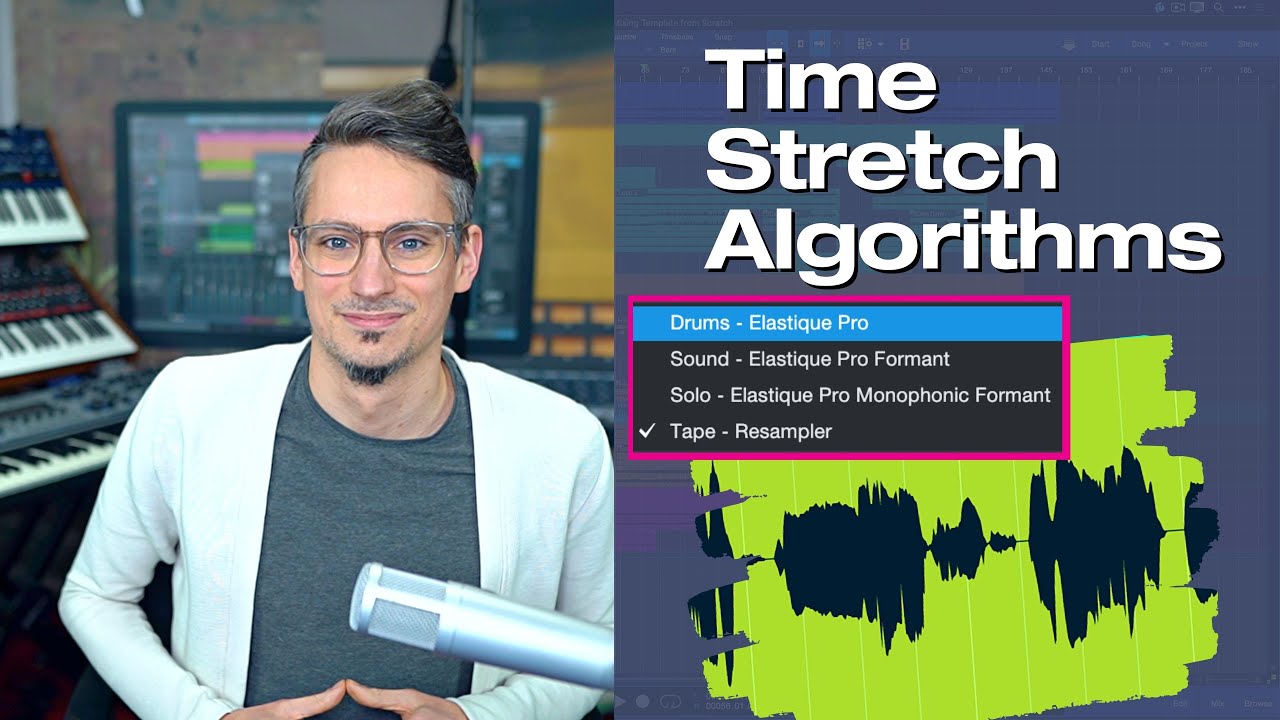
The time stretching itself works ok-ish and I have used that before.
But now my issue is syncing syllables to the beat, ie if I would use the word “syllables” in a track, that it would match Sy-Lla-Bles, the beat being synced to the capital letters.
A less important issue (but still an issue) is to modify the pitch for individual syllables slightly, but this can be done by Melodyne, I guess.
My last experiments with Melodyne turned out soso, possibly cause I don’t know how to use it?!
Re-record the audio? Sometimes the simplest solution is the best

What he said.
The door at the recording studio where I did the most work had a sticker on the door to the office that said “practice more, edit less”
I think about that all the time.
Not to call your practice into question… but, also, many times when we were taking too much time to comp a track together, we’d just go for another take.