I’m going to have to come clean and confess that I don’t own an iPad 
3 Likes

2 Likes
useful, thanx!
1 Like
Yeah I have no interest in video myself. But I do own FCPX for other reasons (my wife has a Youtube channel teaching english).
1 Like
I do own one but I get that. I am not the biggest fan of tablets - greatly prefer laptops. The funny thing about that is I am an iOS developer.
1 Like
Same here. But… I do own a ReMarkable - I really like that thing!
2 Likes
I almost bought one, like really close. Cool devices, but none of them can do everything I want.
My basic feature request is some kind of sane export to doc formats that includes both OCR text and drawing support, and also some kind of basic drawing/graphing tools (like a very light mobile version of OmniGraffle).
1 Like
It’s always like that. However, they will tell you that is a feature 
My biggest gripe is the limited search options (which is to a large degree because I don’t OCR my handwriting; and I sometimes mix three languages when jotting down ideas and sketches…)
2 Likes
Dude, I really need to watch that. I still haven’t. 
To the OP, I generally use a tool like Spleeter or Moises to distill the MP3 of the song into separate tracks, load those into Reaper, mute the bass track, and record my bass in. When I’m done with that, I’ll use OBS to record the desktop audio (Reaper playback) and the video of me just playing along with the audio.
It works, but I don’t know how to mix my bass properly (the Reaper stuff, the reason I keep meaning to watch the videos above) so it never sounds really good.
Davinci Resolve is freaking awesome! I bought the studio version (well, I bought a speed editor keyboard and got the studio version included) once, and have lifetime upgrades. Well worth it. Don’t find the workflow clunky at all. (I’m a huge fan of node-based workflows, though.) It has audio sync (by timecode or waveform), and the instrument remix/isolation tools are as good as any of the stem separators out there.
And the motion fx capabilities that the Fusion module has are incredible, kinda like having the equivalent of both Premiere Pro and AfterEffects in the same program.
1 Like
Oh me too 100%, just pointing out that FCPX has a simple nonlinear editing workflow with lots of additional power if needed.
Disclaimer: Slightly frustrated
There’s got to be a way to just play a song, play along to it, and record the video, song and your bass at the same time. A one stop shop. I don’t understand why we need to be movie producers.
Spent all day today researching and executing trying to get things to work (It didn’t work). Very frustrating.
I tried OBS, it doesn’t pick up on Amplitube (what came with my interface).
I tried using Voicemeter to reroute the audio.
I tried some VB-Cable thing the IK Media site instructs you to do, along with ASIO4ALL drivers.
Had an idea to run my amp to my interface then to the PC, that didn’t do anything.
I think the only thing i accomplished is adding 15 options to my PC’s input output choices.
2 Likes
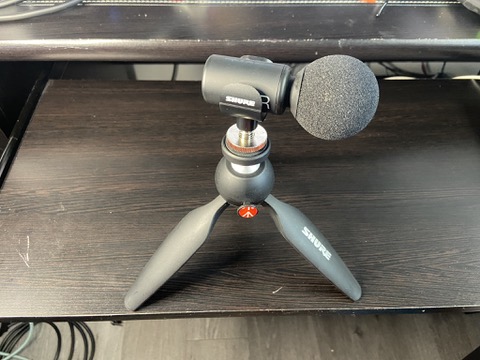
I used this for a while. external mic for iphone. it records the bass and song track with decent quality. I’ll reply with a video when I find one that i used this on.
1 Like
I’ve wondered the same thing 
This one was recorded with the external mic for iphone that I mention above.
And this one was recorded with my iphone mic. I know you can see my scarlett 2i2 with my laptop, but I liked the raw audio enough that I didn’t use the laptop recording. So it’s possible to get a decent sounding recording with just your phone, you just need to get the volumes right out of your audio source and your bass amp and have your phone in a good spot. if your phone is too close to your cab or speaker it wont sound very good. These recordings, in my opinion, are good enough for a cover. anyway, i hope this was a least a little bit helpful.
3 Likes
Awesome recordings! I appreciate the input and demonstrated outcomes! I tried to tackle I feel good right out of the gate when I got my bass, I should go back and take another swing at it.
I did another take (several) with my phone, playing with the volume each time etc. Still dialing it in, but not too bad imo!
I’m not sure how the iphone mic compares to a samsung one.
I am definitely going to look into buying a legitimate mic though, being able to just record play and go frees up the rest of the day.
Anyways, here is the phone recording. I can tell you that the camera itself is better than my laptops. Volume is quite low despite me having the music volume at 80% and amp at about 50% (its only a rumble 15)
3 Likes
that’s not bad.
We don’t, but for myself, I enjoy the whole process, and prefer the end result. I’ve done videos with green screens, and other effects, I just find it a lot of fun.
I did one video where I used my son’s Yeti microphone to record the lot and it was pretty good. And there are plenty of mics to plug into your camera or phone.
I second that. There are a lot of quality YTers that give tutorials too, so easy to learn. I haven’t dived too deeply into the Fusion page yet, I manage mostly just on the edit page, but it is stunning what you can achieve using VFX.
4 Likes
For anyone using Reaper to record their audio and have a separate video file, you can easily drop the video file into Reaper, show the video player and align the audio and video together. You can even do picture-in-picture, but that’s a bit more mucking around.
I only use a video editor if I want to add some text or additional things at the start/end of the video.
I do everything on iPhones (two).
iPhone 1:
- Pull the MP3 of the song into Moises to split into stems. Remove the bass
- Pull the stems into GarageBand
- Plug the phone into my audio interface (either a Scarlett Solo, or a Hotone Ampero)
- Plug in the bass and headphones, and set the recording levels on GarageBand
Phone 2:
- Set it up to video the ‘performance’
- Press record
iPhone 1:
- Press record in GarageBand
Once the performance is complete, i.e., I’ve captured the audio on iPhone 1 and the video on iPhone 2, I then send the iPhone 2 video to iPhone 1.
iPhone 1
- Process / mix the audio in GarageBand
- Save the completed audio track to the iPhone as an file that can be imported into iMovie
- Open iMovie and import both the video and audio
- Sync both. I’ve actually got petty good at this. As others have mentioned, I look for me playing a specific note, then line up on that. Just takes a bit of practice
- Add text to the video - song title & band
- Add my signature video effect
- Export video, ready for upload to YouTube.
For a simple song where I don’t make any mistakes, I can complete the whole process in under 30 minutes. Generally, its between 30 mins and an hour, depending on the number of takes.
The variations to the process are if I am ‘green screening’; that takes a little more manipulation in iMovie. Once you know how to do it, it’s pretty simple, although the results can vary. I’ve found this is a function of the green screen background, the bass I’m playing and the clothes I’m wearing. I don’t always get it right
Sometimes, I will also record the bass and the video completely separately. When I do this, I am then obviously miming playing the bass line in the video (i.e. it is not a ‘live’ recording). In this scenario, the audio is played on iPhone 1, while iPhone 2 is used for video capture. When I do this, the sync process is super easy, I rely on my ears then I bring the audio and video together…
You might ask why I have two iPhones…one is mine, the other is the work phone.
2 Likes