Sometimes I have to shift it a little to make it work, but that’s about as deep as I go. Unfortunately, my playing isn’t always in time, so while I’m editing I have a hard time working out if the audio isn’t synced or if I was just playing off the beat.
I know that when people record audio, they clap and then use that to sync it. I tried kinda slapping the strings with my palm but it didn’t really seem to work for syncing. I think maybe my camera isn’t good enough or the framerate isn’t fast enough. I’m just using my webcam that I use for work. Is there a technique I could try or some other trick that editors use?
I’ve also watched some youtube tutorials but they all seem aimed at people syncing audio of people talking, which Davinci can do automatically, but the auto sync doesn’t work here.
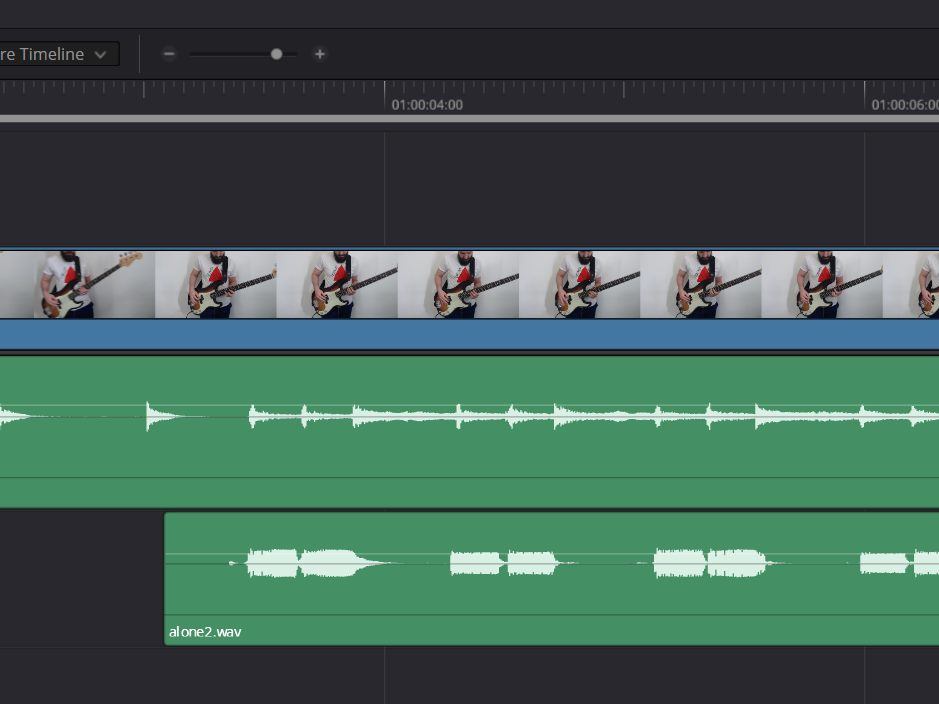
Not too far off from what you do. First I find a moment early on, like the first plucked bass note of the song, and visually line it up. By which I mean I use the waveforms to put it where it looks right, then play it back and make sure what I see matches what I hear. I also trim the audio track so it begins right before that note, for the next step.
Next I go to the end, where everything is almost always slightly off, and stretch or squash the audio track until the last note visually matches.
Finally, depending on your render settings, there’s always the possibility that the final render will have the audio slightly ahead or behind. If that happens I manually nudge it (usually only takes a very small adjustment) and re-render.
I struggled with this early on too and also watched YT tutorials. I eventually moved toward having my interface in the recording frame and line up the first light with my first note.
This gets a bit more complicated later on in the song when “drift” tends to happen. I’ve tried optimizing video frame rate and file formats, but I’ve always had to do a small adjustment to the audio speed to line up with the video. Towards the very end of the video it can be helpful to place a marker on the audio and video where a distinct note is played, then adjust the audio to match with that point.
Resolve can do syncing automatically with music, however, it can be fussy.
I try to get them both close then have it auto sync. It will work but sometimes there is a knack to it if there is too much before/after video or noise. I cut the video down to just the song as well before syncing.
Also note that you can cut an audio track into multiple clips and align each clip. I prefer this to time stretching or compressing the complete audio track. I don’t know about Resolve, but most audio editors can be configured to insert fades between clips automatically, so you don’t get audio glitches.
…or if you are like me your audio is already a bunch of smaller clips because it’s just how I work. It wouldn’t even occur to me to try and record a whole song at once.
I imagined people recorded in one take. But I understand completely if that doesn’t work. I can play some songs without mistakes – unless there is someone looking, someone walks buy, or I’m trying to film myself.
I do try… thing is, the more I already have played/recorded of that take (and played well), the more nervous I get, and the probability of effing up just goes through the roof
It’s about visualization before you start; feeling like a rock or a bamboo in the wind etc.; and then not “think” anymore, but instead be in the “zone” when recording…
Many DAWs have a “record take” function, where you can record multiple takes and then slice each take and build the main track from the best slice from each of the takes. Studio One Pro is really good at this.
At this point all the major DAW can, though Ableton only added comping pretty recently.
Another cool feature some DAW have is recent capture, where it is always recording into a buffer at all times and if you nail something but weren’t recording, you can hit a hotkey and it’s there as if you had been. For example, in Logic:
Follow up question: What software are you all using to record the video?
Right now I’m using OBS Studio to record the video and backing track, and I use Ableton to record my playing.
I just did a recording and the audio and video from OBS weren’t syncd, which was annoying as they were recorded ‘live’ simultaneously. So I’m wondering if there’s a bettwe alternative to OBS.
I do my work in Mac, so I use the built in tools there. I thought you could record audio and video in OBS? I would think that would make it a bit more seamless.
Also, I never ever record my audio and video at the same time. I can look like a hyperfocusing goblin all I want when I’m getting the audio then do my best to look suave and sexy when I’m getting video.


 )
)

