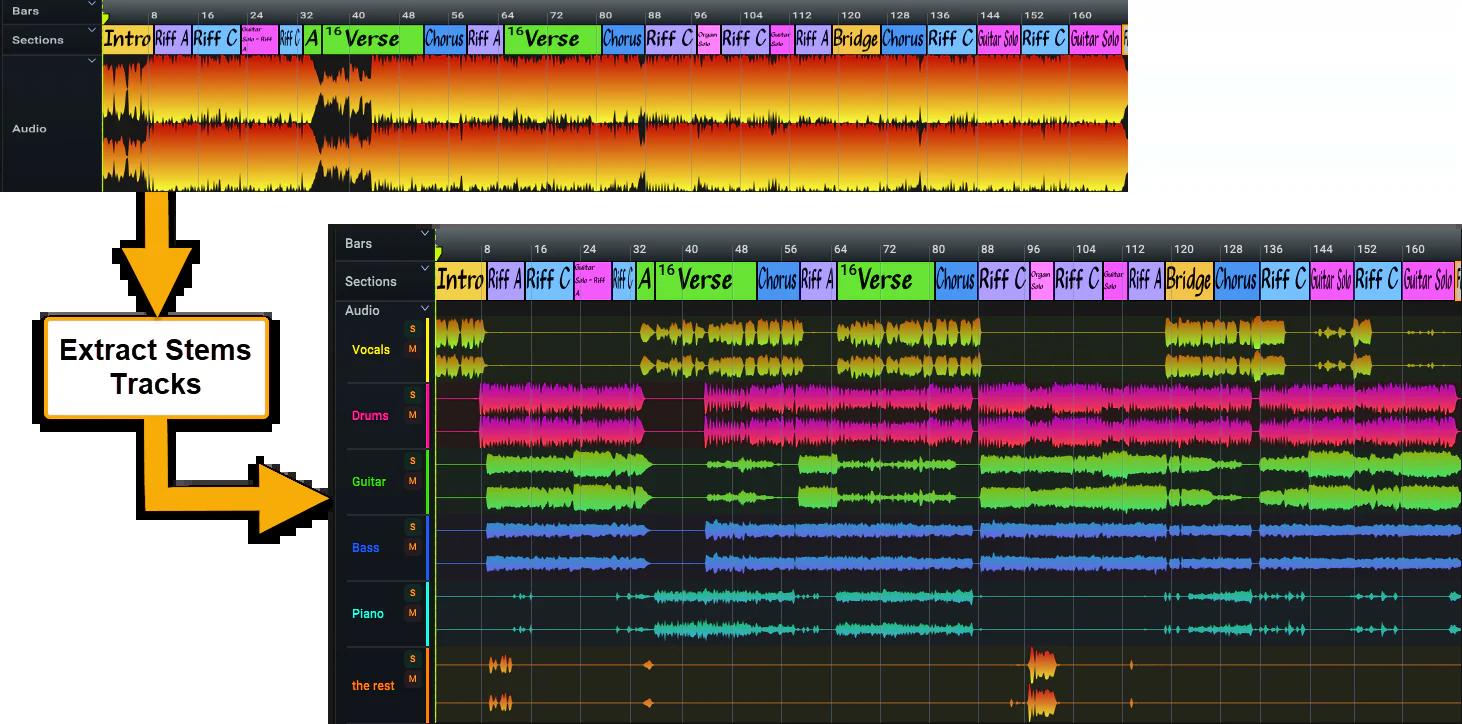
Curious to hear if anyone has used the stem separation features from Presonus Studio one?
My Moises sub is about to expire and instead of the $39.99/yr subscription I’m wondering if it would be worth just buying for $199 and just using the stem separation in there and having a full paid DAWrather than getting by with Reaper and Ableton live lite.
I’m also fine if you want to just talk about what DAW you love the most
FWIW Reaper is not “getting by”, it’s one of the two most powerful DAWs, just with a very good price tag. However it does not have built in stem separation and instead relies on plugins for that (such as Steinberg SpectraLayers).
Also, never pay $199 for Studio One, especially since you get a free permanent full license for it with any Presonus hardware over $200 anyway
Yea by getting by I mean my a** is spoiled and I’m messing around with new DAWs instead of practicing
I hear you on the equipment purchase aspect. I’m not in love with my Scarlet 2i2 but I own it.
I also learned today that the reaper plugins are available for free meaning technically I could use their better EQ in Live lite instead of the cheezy 3 band. REAPER | ReaPlugs
I think my next step is using the session functionality of Live Lite to play around with looping and improvising there. I have a pedal but if I like something I have to plug it in and do all of these things rather than just hitting save.
I think I got Live Lite with my novation launchkey 25 mk3… Wonder if there are any other deals other there for gear+ DAW.
Oh yeah there’s tons. As mentioned, Presonus gives away full Pro versions of S1 with their hardware over $200-ish, and Artist versions for hardware under that. Most MIDI controllers give away Ableton Lite. MOTU gear probably sometimes comes with Digital Performer. My interface came with a permanent Essentials license for Bitwig. My SSL came with a bunch of their stuff plus NI Komplete. Etc etc.
Anyway, back to S1, it also goes on deep sale and you can also buy it from other people on KVR or KnobCloud. Usually you can find full pro versions for around $50. Here’s a dude selling it for $69 right now:
Keep an eye out for “sales” of paid plugins for $0, plus there’s some really solid free ones anyways - and of course the pile of plugins you get with purchases like interfaces and your LaunchKey.
The general rule of thumb is never pay full price for audio software; most of it, with a few notable exceptions, goes on frequent deep sales. The sale price is the real price.
And darn it, Serum is one of those exceptions. It never goes on sale. I haven’t bought it, and probably never will.
As for stem separation, I ditched Moises after one year. There are too many good, less expensive alternatives. Since you have DAWs covered, you might want to consider adding Song Master with its stem separation capabilities. I bought the Pro version for 86,41 € ($95-100) for all of its additional features, but even the base version for 51,83 € ($55-60) does stem separation. Song Master is an excellent tool for learning new songs.
@TheMaartian Just curious, what made you decide use song master instead of moises? Was it cost or stem separation quality or maybe something else ?
I use the paid version of moises, mainly for stem separation playing along with songs with the original bassline removed and slowing songs down to learn them.
Overall it’s fine for me but I’m not a big fan of subscriptions , I like it better to pay once and own something and not pay a little bit every month ending up with higher cost at the end. ( I have probably already payed moises 100eur since I started playing )
If Song master is better in all of those things I use moises for now I might consider buying songmaster.
If you buy the PreSonus Quantum ES2, you get Studio One for fee. And it costs much less then $199.
I have used Moises (the cheaper version), RipX and Studio One 7 Pro and found the Moises version and Studio One on par. RipX is a little better for stem seperation. But Studio One Pro is a complete DAW, and very good & easy to use.
#2 All stem separators now are pretty decent. If Song Master or Studio One separations for bass are a little lacking for a given song, I run it through Melodyne. I’m less concerned now with how well summed stems null the phase inverted original audio track.
#3 Song Master Pro is an excellent tool for learning new songs.
#4 It’s fast and has an excellent user interface. Really easy to use.
I mean if we’re talking GAS, hold up, there’s a lot more to consider if you really like this feature - there’s also Steinberg SpectraLayers, not to mention Cubase, Logic Pro, and other DAWs that have it built in. And then there’s Deezer’s Spleeter, which most of these are originally based on, and IIRC iZotope has theirs.
IMO split stems sound terrible, in part because:
The problem is phase is an issue and the stems never sum back and sound the same. The filtering involved, being digital, will be nonlinear in phase shift across the audio spectrum and the split stems simply don’t sum up exactly the same. Also, splitting something that has been mastered and remixing it is problematic simply because it’s already been mastered. It’s fine for covers though.
I have enough stem splitters as is, so that’s not my issue. I am lazy, so I use the one of Studio One Pro, which is good enough (sometimes RipX DAW is better though).
For learning songs, I am curious for Song Master Pro.
Currently I use Tonelib Jam for that. I am super happy with it, but I do play “by numbers”, without a good understanding of the song.
I do hope somehow, that the chords and the sections view would improve my understanding of what I’m doing?
Also, neither Studio One Pro nor RipX Pro detect beats properly, so BPM/bar is sometime incorrect - which affects the metronome function.
My first test with Song Master Pro are very promising in this respect.
My workaround in Rip X DAW is to export the track with a muted bass stem (not importing individual stems in my DAW). The rest of the track is untouched.
This will result in maximum quality of the bassless track.
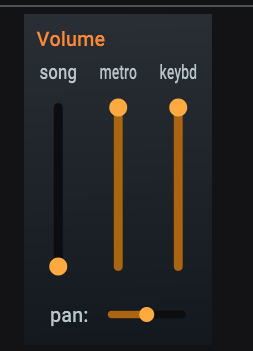
Use the metro volume slider to the right of the song volume slider. The sliders are to the right of the Metronome box bottom right.
To export just the metronome audio, set the song volume slider to minimum (muted) and then select File | Export Audio. Note that each successive export will overwrite the previous one if you don’t change the filename in the Export dialog. If no loop is set, it defaults to exporting the entire song, or just the looped audio if a loop is set. You can also use this feature to export a bassless song by muting the bass stem doing a full song export.
Also, SMP has never crashed on my once in the years that I’ve used it.
Also also, I really like the Chord detection feature. It’s great to follow along with the chords while playing/improvising the bassline.
Also also also, the Pro version gives you audio-to-MIDI with piano roll view and MIDI exports.
Yes, I’m using ASIO (RME Fireface UCX II set for 48000 at 256 samples). Zero problems. It could be an ASIO driver issue for you. What DAI and what settings are you using?


 especially with Black Friday coming up.